SVG and PNG are two of the most common file formats included in digital craft downloads. They may look nearly identical inside a ZIP folder, but they store artwork differently and are designed for different production methods.
Choosing the wrong format can result in blurry printing, rough cut lines, missing layers, or extra time spent tracing and cleaning a design. The right choice depends on whether your project will be cut, printed, or used with Print Then Cut.
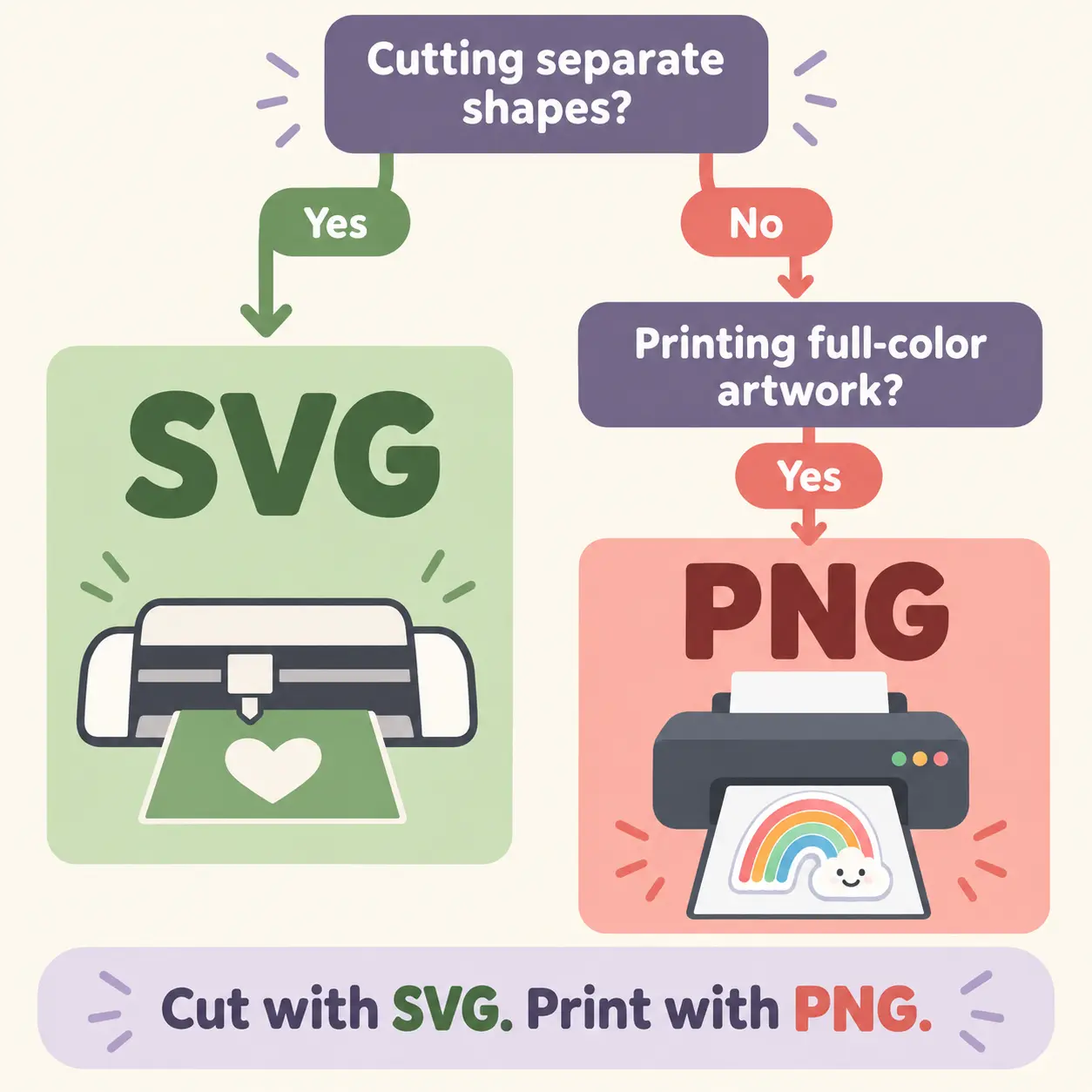
The short answer: choose SVG when you need clean cutting paths, scalable artwork, or editable layers. Choose PNG when you need full-color printing, sublimation, transparent-background artwork, or Cricut Print Then Cut.
SVG vs PNG: Quick Answer
SVG is usually the better choice for cutting, while PNG is usually the better choice for printing. Neither format is universally better—the correct format depends on the final project.
| Feature | SVG | PNG |
|---|---|---|
| File structure | Vector | Raster or pixel-based |
| Best use | Cutting and editing | Printing and sublimation |
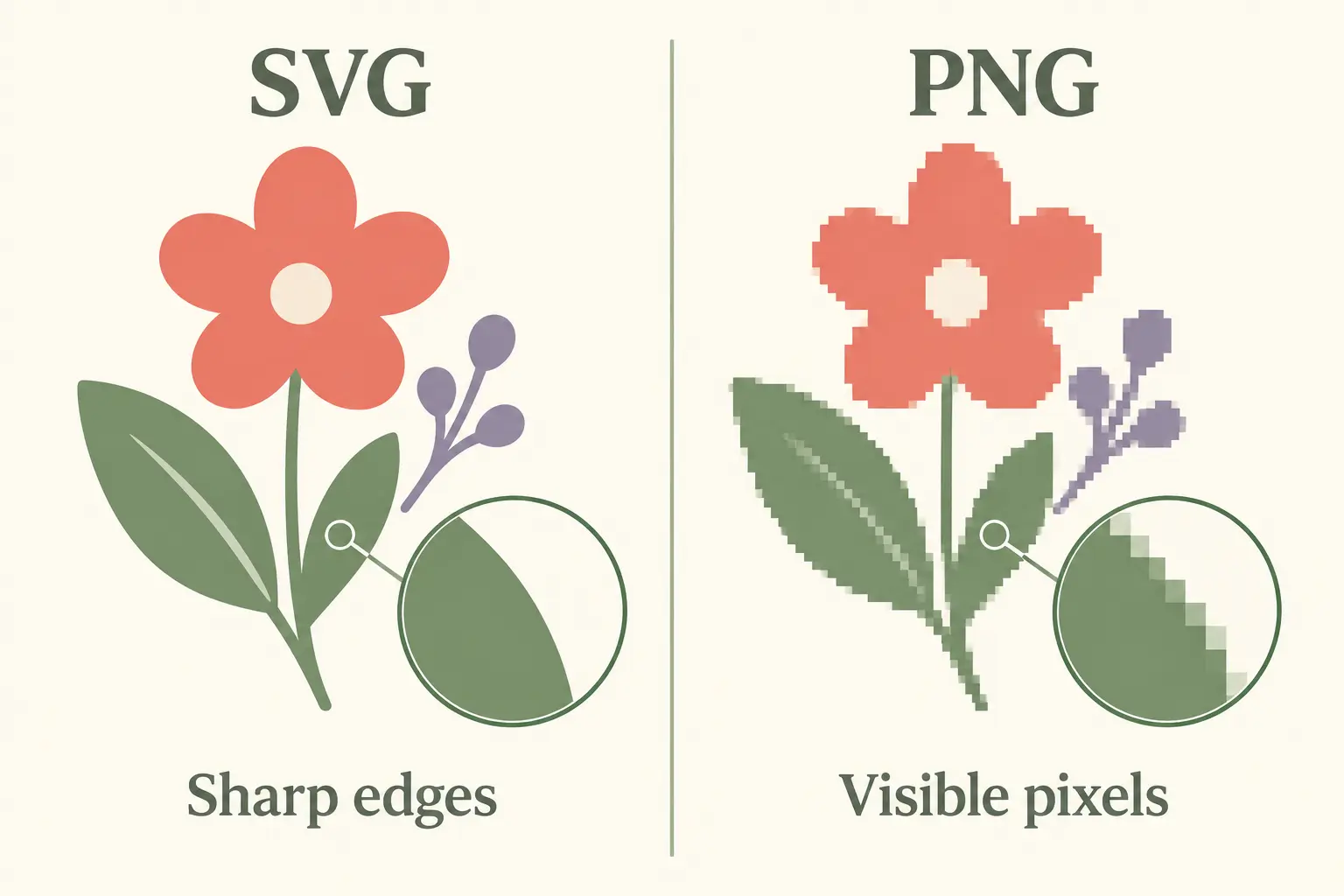
| Resizing | Stays sharp at any size | May become pixelated when enlarged |
| Transparent background | Supported | Supported |
| Editable elements | Usually editable | Flattened image |
| Cricut Basic Cut | Excellent choice | May require cleanup or tracing |
| Cricut Print Then Cut | Not normally the final format | Excellent choice |
| Full-color artwork | Limited for complex effects | Excellent choice |
| Watercolor and texture | Not ideal | Excellent choice |
For example, a simple floral design might be supplied as both an SVG and a PNG. The SVG version is useful for cutting the flower from vinyl or cardstock. The PNG version is more suitable for printing the same flower as full-color artwork.
What Is an SVG File?
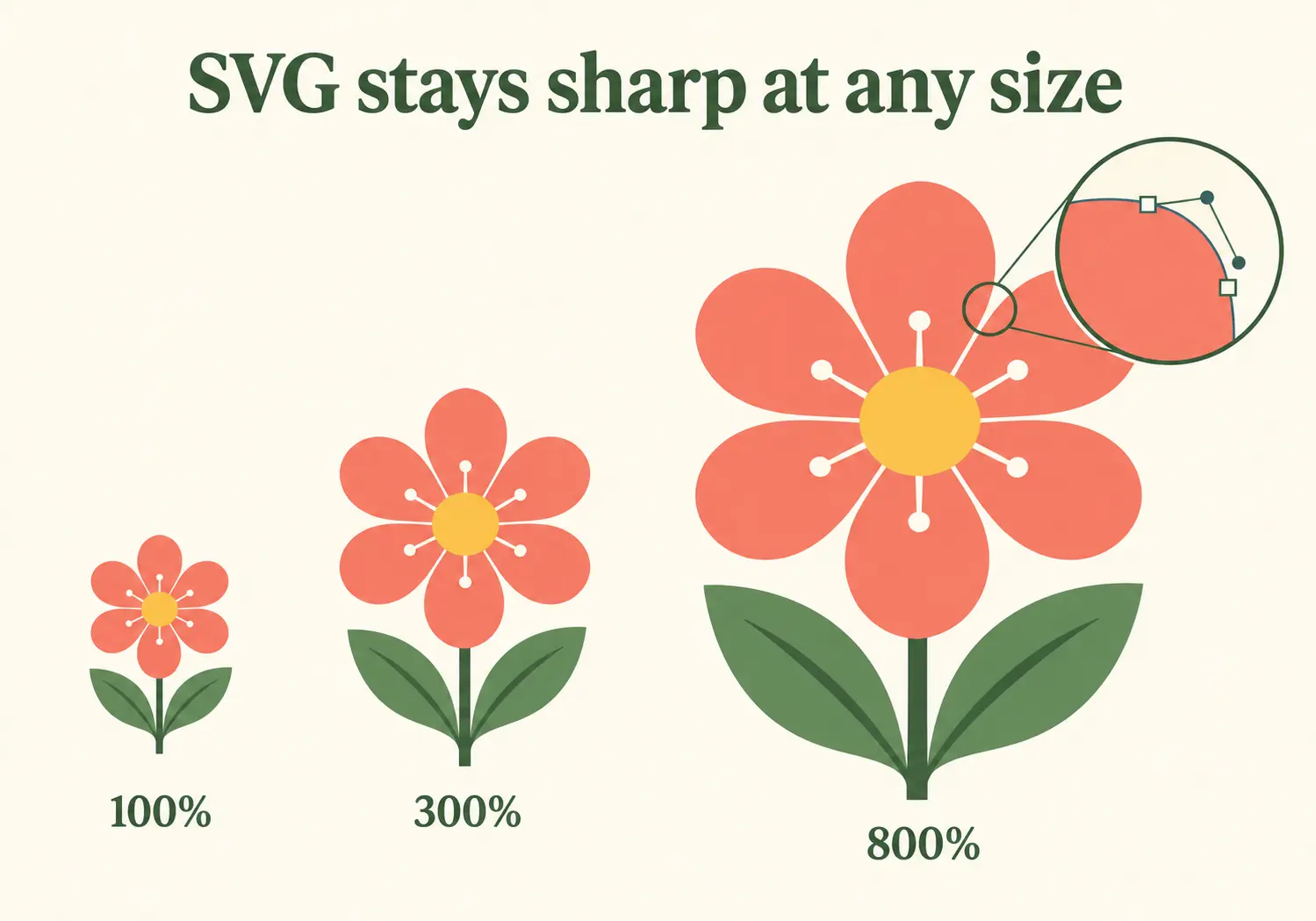
SVG stands for Scalable Vector Graphics. Instead of building an image from a fixed grid of pixels, an SVG uses paths, shapes, curves, and anchor points to describe the artwork.
Because the design is mathematically defined, it can be enlarged or reduced without becoming blurry. A well-prepared SVG can also contain separate elements or layers that users can resize, recolor, hide, or rearrange.
Advantages of SVG files
- Scalable quality: SVG artwork remains sharp when resized for a small label, large sign, or other cutting project.
- Clean cutting paths: Cutting software can follow the vector paths without tracing a flattened image first.
- Editable elements: Colors, layers, and individual components can often be changed separately.
- Efficient for simple designs: Basic shapes, lettering, and line art can be stored in relatively small files.
- Flexible project sizing: One design can be adapted to different blanks and materials without losing edge quality.
Best projects for SVG
SVG files are generally the best choice for projects where a machine needs to follow precise paths:
- Heat-transfer vinyl shirts
- Adhesive vinyl decals
- Wooden signs and lettering
- Layered cardstock projects
- Paper decorations
- Labels and stencils
- Simple laser-cutting projects, when the design is prepared correctly
Limitations of SVG files
SVG is not the best option for every type of artwork. Photographs, watercolor textures, realistic shadows, and highly detailed color effects are generally easier to preserve in a raster format such as PNG.
An SVG may also cause problems when it contains an excessive number of nodes, unsupported effects, or text that has not been converted into paths. These issues can make the design slow to load or cause it to appear differently after import.
What Is a PNG File?
PNG stands for Portable Network Graphics. It is a raster format, meaning that the image is made from a fixed grid of pixels. Each PNG therefore has a specific pixel width and height.
PNG supports transparent backgrounds and can preserve full-color artwork, gradients, shadows, watercolor effects, and detailed textures. This makes it especially useful for printing and sublimation.
Advantages of PNG files
- Transparent backgrounds: The artwork can be placed on different colors without displaying a rectangular white background.
- Full-color support: PNG preserves complex colors, shading, gradients, and textures.
- Suitable for printing: High-resolution PNG files work well for sublimation, DTF transfers, and printable projects.
- Print Then Cut compatibility: A PNG can be printed as a complete image and then cut around its outer edge.
- Broad software support: PNG works with most image editors, design applications, and web browsers.
Best projects for PNG
- Sublimation shirts
- Mugs and tumblers
- Printable stickers
- Cricut Print Then Cut
- DTF and printable transfers
- Watercolor artwork
- Digital scrapbooking
- Invitations, mockups, and website previews
Limitations of PNG files
A PNG does not remain infinitely sharp when enlarged. If the image contains too few pixels for the intended print size, its edges may become soft or visibly pixelated.
A PNG is also a flattened image. Its individual colors and design elements usually cannot be edited as easily as the paths in an SVG. When used for a Basic Cut project, the PNG may need to be traced or cleaned before the machine has a usable cut line.
SVG vs PNG for Cricut
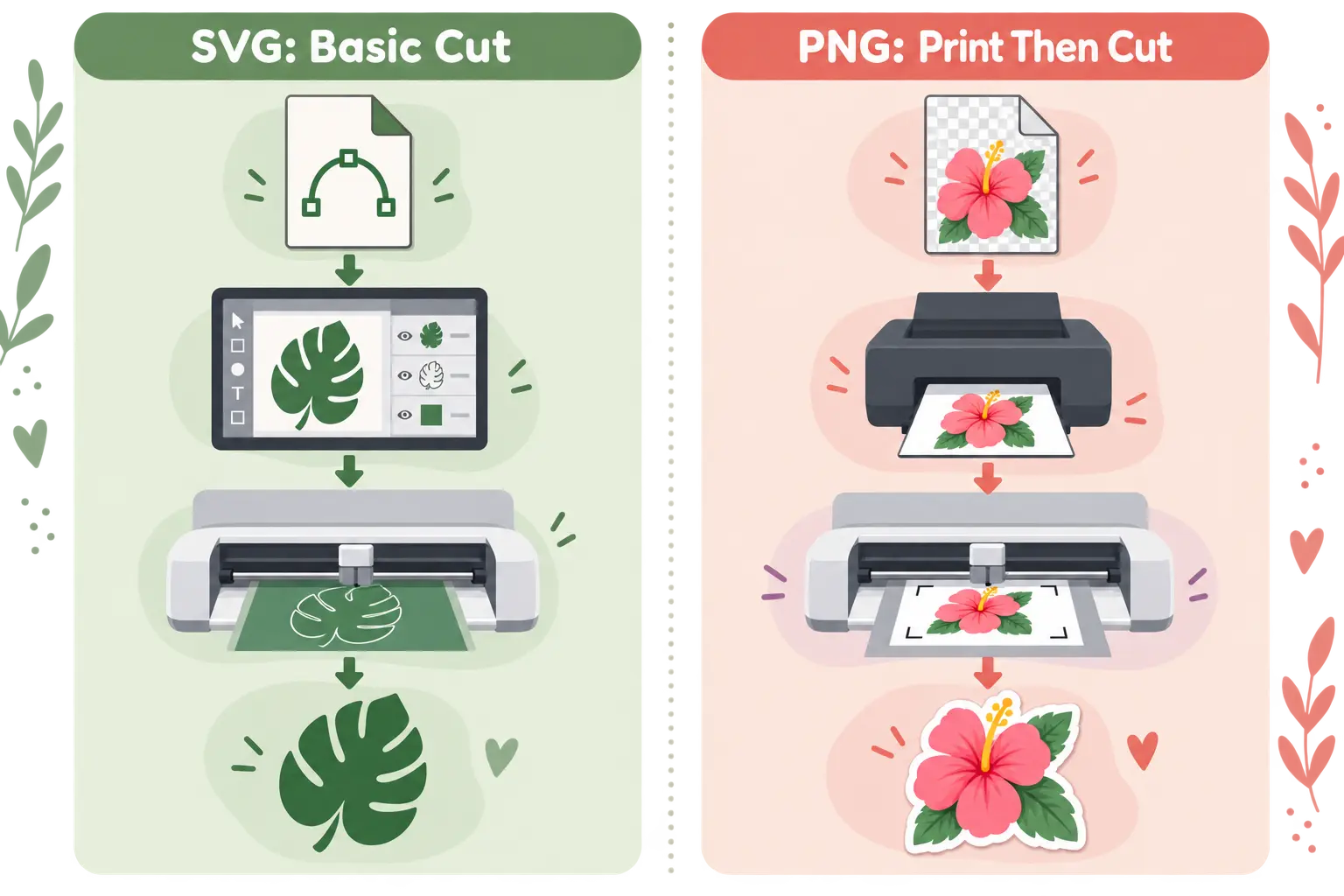
The best format for Cricut depends on whether the project uses Basic Cut or Print Then Cut.
Choose SVG for Basic Cut projects
For a Basic Cut project, Cricut Design Space needs paths that tell the machine where to move the blade. A properly prepared SVG already contains those vector paths.
The usual SVG workflow is:
- Upload the SVG into the design software.
- Resize the design and adjust its layers or colors.
- Choose the appropriate material and cut settings.
- Send the vector paths to the cutting machine.
SVG is the preferred choice for heat-transfer vinyl, adhesive vinyl, cardstock, labels, stencils, and layered signs.
Choose PNG for Print Then Cut
Print Then Cut uses a different process. The complete artwork is first printed with a standard printer. The cutting machine then reads registration marks and cuts around the printed design.
The usual PNG workflow is:
- Upload a transparent-background PNG.
- Set the artwork up as a Print Then Cut image.
- Print the design and its registration marks.
- Place the printed sheet on the cutting mat.
- Let the machine scan and cut around the artwork.
PNG is therefore ideal for full-color stickers, printable vinyl, watercolor graphics, and designs with detailed textures.
SVG is generally better for Cricut Basic Cut. PNG is generally better for Cricut Print Then Cut.
SVG vs PNG for Silhouette
The same general rule applies to Silhouette projects: use SVG when you need editable vector paths and use PNG when you need a printed full-color image.
A PNG can be traced to create a cut line, but tracing may produce rough edges or unnecessary nodes, particularly when the source image is small or has low contrast. Starting with a clean SVG is normally more efficient for a cutting-only project.
SVG import support may depend on the edition and current version of Silhouette Studio. Users should check the features available in their installed software before selecting a download format.
SVG vs PNG for Sublimation
PNG is usually the more practical final format for sublimation printing. Sublimation requires a printable image rather than separate cutting paths, and PNG can preserve full-color artwork, watercolor effects, shadows, gradients, and transparent backgrounds.
That does not make SVG useless for sublimation. An SVG can serve as an editable source file. A crafter can resize the design, modify its colors, arrange its elements, and then export the finished artwork as a high-resolution PNG for printing.
Consider these examples:
- A simple one-color quote can begin as an SVG and then be exported for printing.
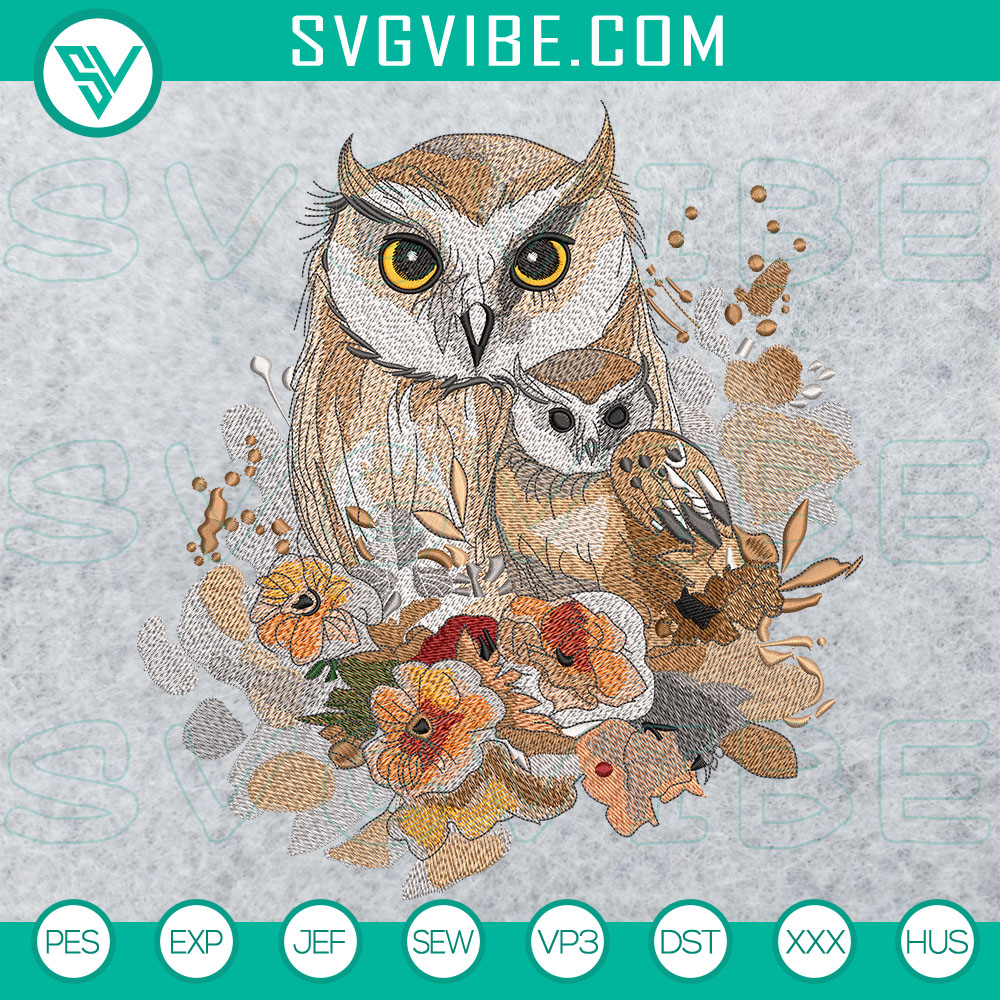
- A watercolor floral composition is better preserved as a PNG.
- A textured tumbler wrap will normally be supplied as a high-resolution raster image.
- A logo that requires frequent color and size changes should be retained as an SVG master file.
Always check the pixel dimensions of a PNG before using it for a large sublimation project.
Does PNG Lose Quality When Resized?
A PNG can usually be reduced without a noticeable problem, but enlarging it beyond its original dimensions forces the software to create additional pixels. The resulting image may look soft, blurry, or blocky.
DPI metadata alone does not determine the amount of image detail. The actual pixel dimensions are essential. A 4,000 × 4,000-pixel image contains substantially more visual information than a 500 × 500-pixel image, even if both files display the same DPI value.
Changing a low-resolution PNG from 72 DPI to 300 DPI does not automatically add genuine image detail. For reliable results, begin with enough pixels for the intended print dimensions.
Can You Convert PNG to SVG?
A PNG can be traced and converted into vector paths, but conversion does not restore the original vector data. The software estimates paths by analyzing the visible pixels.
Simple artwork with solid colors, clean outlines, and strong contrast is easier to trace. Photographs, watercolor artwork, gradients, and detailed textures usually produce overly complex or inaccurate paths.
Automatic tracing may also create hundreds or thousands of unnecessary nodes. These paths should be inspected and simplified before sending them to a cutting machine.
Renaming a file from .png to .svg is not a real conversion. If the original SVG is available, downloading it is normally preferable to tracing the PNG version.
Can You Convert SVG to PNG?
SVG can be exported as PNG using vector-editing or design software. Select a sufficiently large pixel size during export and keep the background transparent when the project requires it.
Once exported, the PNG no longer has the unlimited scaling capability of the source SVG. Keep the original SVG so that the design can be edited or exported again at a different size later.
Which Format Should You Choose?
| Your project | Recommended format | Reason |
|---|---|---|
| Vinyl lettering | SVG | Provides clean cutting paths |
| Layered cardstock | SVG | Elements and layers can be edited |
| Large stencil | SVG | Can be enlarged without pixelation |
| Printable sticker | PNG | Supports full-color Print Then Cut artwork |
| Sublimation shirt | PNG | Preserves color, texture, and transparency |
| Watercolor design | PNG | Preserves raster effects |
| Design requiring individual color edits | SVG | Vector elements may be changed separately |
| Website preview | PNG or WebP | Displays easily in modern browsers |
A useful rule to remember is: cut with SVG and print with PNG.
Where to Download Free SVG and PNG Files
Free design files are useful for testing a cutting machine, trying a new material, practicing a workflow, or planning a creative project before purchasing a larger premium bundle.
MotifGrove is a growing creative resource library where crafters can explore free design files for cutting and printing projects. Before using a download, check the formats included in its ZIP archive and review the licensing information provided for that individual design.
Choosing a file from a clearly organized resource library also makes it easier to identify whether the download is intended for vector cutting, full-color printing, or another production method.
Check the License Before Using Any File
A free download does not automatically include unrestricted commercial rights. The license may allow personal projects while limiting commercial production, print-on-demand use, redistribution, or resale.
Before using any SVG or PNG, check whether the license permits:
- Personal craft projects
- Selling finished physical products
- Print-on-demand production
- Modification of the original artwork
- Use in a logo or business identity
Do not resell, share, or upload the original digital file unless its license explicitly allows redistribution. Extra care is also necessary with protected characters, logos, team identities, artists, and trademarks.
Frequently Asked Questions
Is SVG higher quality than PNG?
SVG remains sharp when resized because it is vector-based. PNG quality depends on its pixel dimensions. However, PNG is better at preserving photographs, watercolor effects, gradients, shadows, and other detailed raster artwork.
Should I download SVG or PNG for Cricut?
Download SVG for Basic Cut projects involving vinyl, cardstock, labels, or stencils. Download PNG for Print Then Cut projects involving stickers, printable vinyl, or full-color artwork.
Is PNG better than SVG for sublimation?
PNG is usually the better final format for sublimation because it preserves full-color artwork, texture, gradients, and transparent backgrounds. SVG can still be useful as an editable source file before the design is exported for printing.
Can I use a PNG as a cut file?
Yes, but the PNG may require background removal, tracing, or the creation of a cut outline. For a cutting-only project, a properly prepared SVG is normally easier to use.
Why does my PNG look blurry when printed?
The PNG may contain too few pixels for the selected print dimensions or may have been enlarged beyond its original size. Check the image’s pixel width and height rather than relying only on its DPI metadata.
Can I change the colors of an SVG?
Usually, yes. If the SVG contains separate editable paths or layers, their colors can be changed individually. A flattened or poorly structured SVG may offer fewer editing options.
Final Verdict: Is SVG or PNG Better?
Neither format is better for every project. SVG is the better choice when a machine needs precise cutting paths, scalable artwork, or editable layers. PNG is the better choice when the project requires full-color printing, sublimation, watercolor effects, or Print Then Cut.
Use SVG when your project is primarily cut. Use PNG when your project is primarily printed. Selecting the format according to the production method will produce cleaner results and reduce unnecessary file preparation.